For IPTV Resellers & Providers

Your Brand.
Your Subscribers.
Zero Development.

Launch a professionally branded IPTV app under your own name in days — with a built-in control panel to manage your server and message your subscribers without touching a single line of code.

3 Things That Change
Icon · Logo · Name
5 Supported Platforms
Android · Fire TV · iOS · Win · Samsung
5 Devices Per Subscriber
Synced to the cloud
0 Lines of Code
You Ever Write
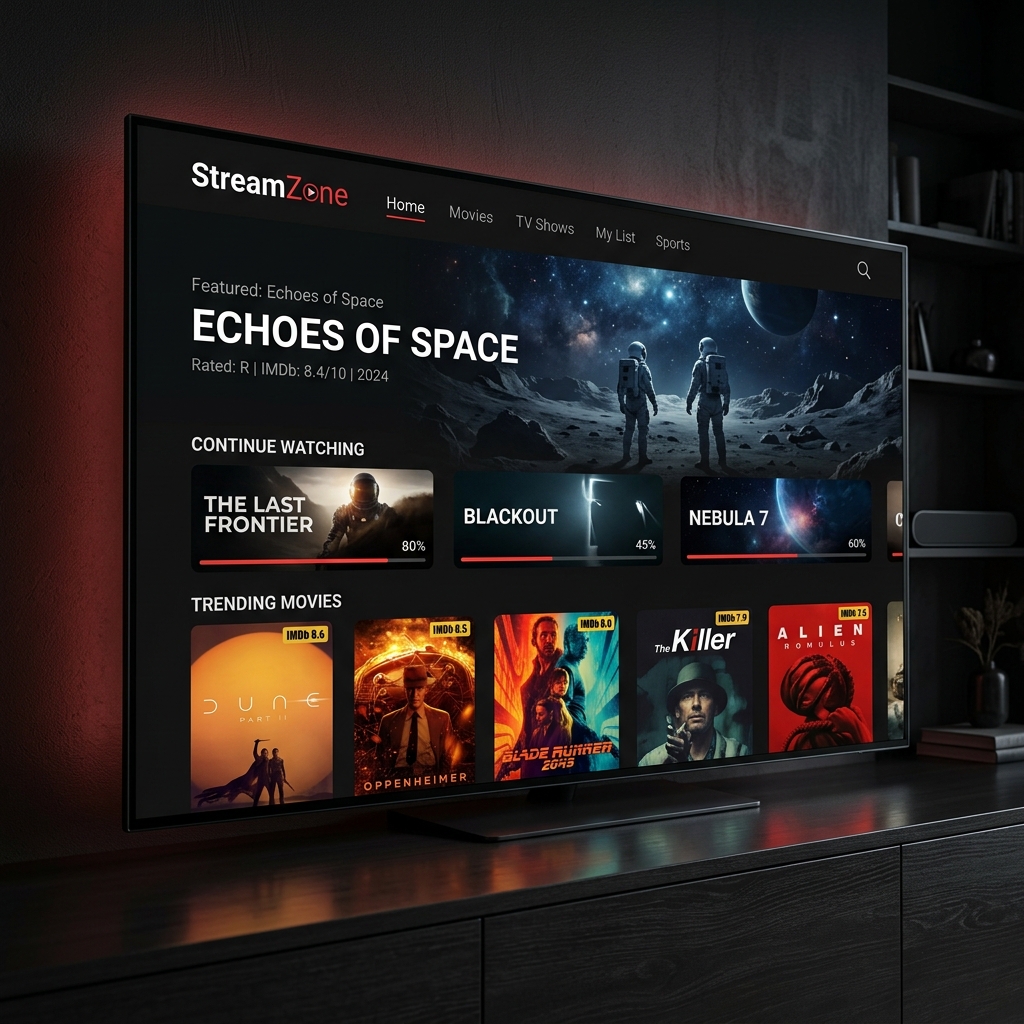
StreamZone — a white-labelled Apex Stream app on Android TV
This could be your brand

Live in 3–5 Days

No back and forth. No lengthy development cycles. Just three straightforward steps.

01

Send Your Branding

Share your logo, your chosen app name, and your IPTV server URL. That's all we need to get started.

02

We Build Your App

We customise the splash screen, icon, in-app name, and hardcode your server URL. Your subscribers see only a clean, branded login — no exposed technical details.

03

You're in Control

We deliver your APK. You publish to your own store. Use your Reseller Control Panel to update your server URL or broadcast messages — no rebuild ever needed.

You publish to your own Google Play / Amazon App Store account. We supply the APK and guide you through the submission process.

What Your Subscribers Actually Get

This isn't a repackaged open-source player. It's a ground-up, natively built IPTV application that earns your subscribers' loyalty.

Clean Login Experience

No Server URLs.
No Technical Jargon.

Your subscribers open your branded app and see exactly what they should: your logo and a clean Username / Password login. The IPTV server address is hardcoded and completely hidden from end users — protecting your credentials and your business.

  • Polished, branded splash screen on launch
  • Username & Password only — no URL field
  • Server address never visible to subscribers
  • Your name, not "Apex Stream", shown throughout
Premium Content Experience

A Platform That Earns
Its Subscription.

Apex Stream is a natively-built .NET MAUI application with a SQLite-cached IMDB metadata engine, giving your subscribers instant poster and ratings data — no lag, no blank tiles. It's the quality of experience that makes people renew instead of cancel.

  • Live TV with full EPG + Catch-Up support
  • Movies & Series with IMDB ratings & artwork
  • Netflix-style "Continue Watching" carousels
  • Master search across all content in one keystroke
  • Parental controls with PIN protection
  • Fully D-Pad optimised for TV remote navigation
Apex Stream movie dashboard on Android TV
Cross-Device Cloud Sync

Subscribers Who Stay
Are Subscribers Who Pay.

Favourites, watch progress, and viewing history sync to the cloud automatically. When a subscriber reinstalls or switches devices, everything is waiting for them — exactly as they left it. This makes switching to a competitor genuinely painful.

  • Install & sync on up to 5 devices per subscriber account
  • Cloud-synced favourites across all devices
  • "Continue Watching" survives reinstalls
  • Pinned actors, custom categories — all preserved
  • Works on Android TV, Fire TV, iOS, Windows & Samsung
Android TV
Cloud Sync
iOS
Fire TV
Favourites
Windows

Stay in Control —
Without Touching the App

When you need to update your IPTV server URL or message your entire subscriber base, you don't call a developer. You do it yourself in seconds.

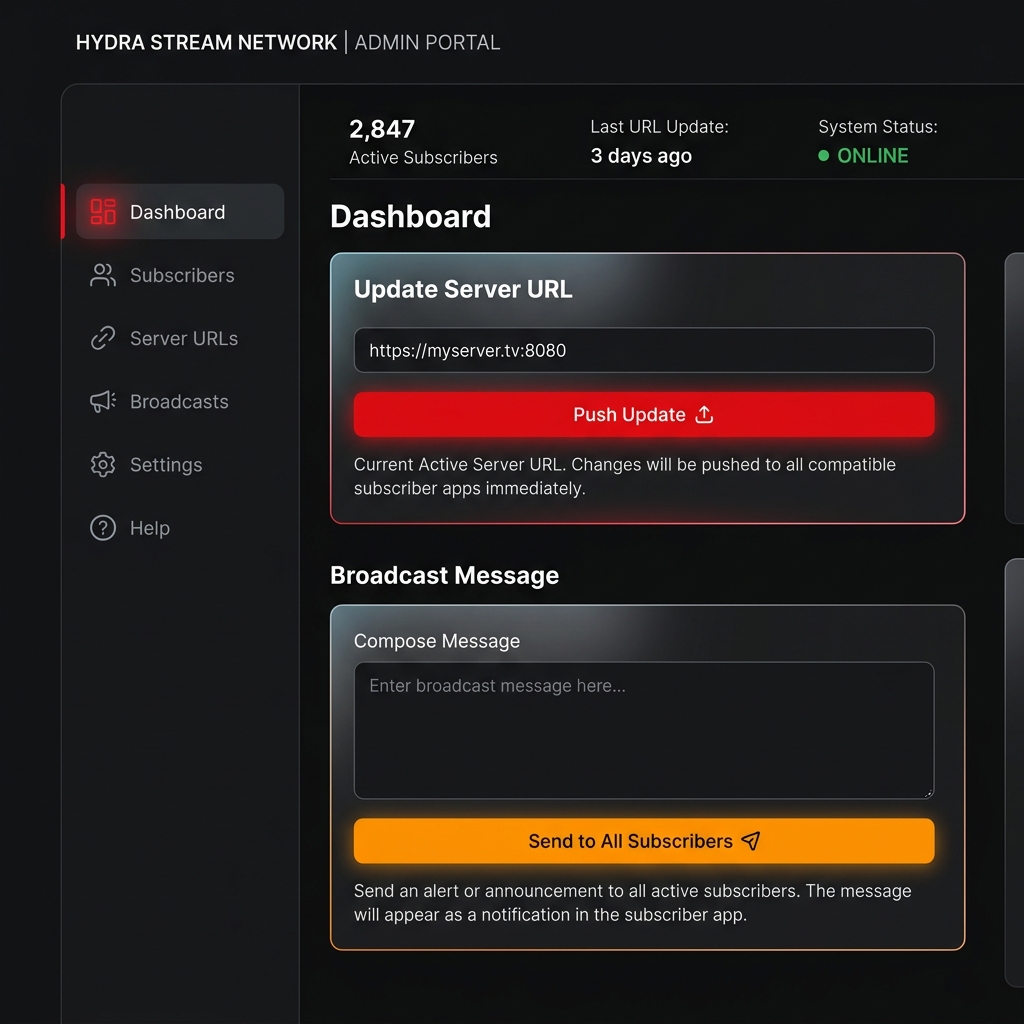
Update Server URL

Switching IPTV providers? Migrating servers? Enter your new URL and hit Push. Every subscriber's app updates automatically via Firebase Remote Config — no rebuild, no resubmission to the app store.

Broadcast Messages

Send a push notification or in-app message to every subscriber at once. Perfect for planned maintenance, new channel announcements, or seasonal promotions.

Your Server URL Is Always Hidden

Your IPTV credentials are hardcoded and never displayed to subscribers. No screenshots of your server address being shared online or sold to competitors.

Apex Sentinel — Community Dead-Link Shield

When a subscriber's app hits a broken stream, it's silently logged to the Apex Sentinel cloud network. That intelligence is shared across all clients instantly — and every Live TV channel, Movie, and Series displays a real-time ● green or ● red status indicator so subscribers know what's working before they even press play. No manual intervention. No support tickets.

Live Already

The Reseller Control Panel is operational. You get access from day one — not a future roadmap item.

Apex Stream Reseller Control Panel dashboard

Simple, Transparent Pricing

A one-off build fee to get your app live, then a low monthly fee to keep everything running and in your hands.

One-Off Setup Fee
Standard
299
One time
  • Custom app icon
  • Branded splash screen
  • Your name in-app
  • Hardcoded server URL
  • Android TV + Fire TV APK
  • Delivered within 5 working days
  • iOS / Windows / Samsung
Get Started
Monthly Maintenance
Essential
29 /mo
Per month
  • Reseller Control Panel access
  • Server URL management
  • Subscriber broadcast messages
  • App updates with platform releases
  • Firebase & cloud infrastructure
  • Priority support
Get Started
Think of it this way: A freelance developer charges €300–€600 just to update a single app build. With Apex Stream, your entire app is professionally maintained — and you can update your server URL yourself — for as little as €29 a month.

A Branded App Is a Retention Tool

Not just a nice-to-have. Here's why a professional branded app directly impacts your bottom line.

🏆

First Impressions Convert

A subscriber who downloads "YourBrandTV" from the app store trusts it more than a generic player called "IPTV Smarters". Your name on the icon is brand equity that converts free trials into long-term subscriptions.

🔒

Creates Real Switching Costs

Cloud-synced favourites, watch history, and custom content libraries mean subscribers have real data invested in your app. Moving to a competitor isn't just inconvenient — it means losing everything they've built.

📣

A Direct Communication Channel

Broadcast messages let you reach every subscriber instantly — maintenance alerts, new channel packs, holiday promotions. No relying on email open rates or social media algorithms.

🔐

Protects Your Business

Your IPTV server URL is hardcoded and never visible to subscribers. No screenshots being shared in forums. No credential leaks. Your panel access stays yours.

🛡️

Self-Healing Channel Quality

Apex Sentinel monitors stream health across the entire network. Every Live TV channel, Movie, and Series displays a ● green or ● red status icon — so subscribers see what's working before pressing play. Dead URLs are logged to the cloud and shared across all clients automatically, keeping your catalogue clean without lifting a finger.

📲

One Subscription, Five Screens

Subscribers can install your branded app on up to 5 devices — TV, phone, tablet, laptop — and their entire library, watch progress, and favourites follow them everywhere. More screens means more daily usage means more renewals.

Ready to Launch
Your App?

Fill in the form and we'll come back to you within one business day with a confirmed timeline and next steps.

Do I need my own developer store account?

Yes — to publish to Google Play or Amazon App Store, you need your own developer account. We supply the APK and will guide you step-by-step through the submission process.

Can I change my server URL after launch?

Yes, that's exactly what the Reseller Control Panel is for. Log in, enter the new URL, hit Push — every subscriber's app updates automatically.

What happens when you release a new feature?

Your app is updated automatically as part of your monthly plan. Essential plan gets updates on schedule; Pro plan gets them on launch day.

Can my subscribers see my server address?

No. The server URL is hardcoded into the app binary and is never displayed anywhere in the UI — not on the login screen, not in settings, nowhere.

How many devices can a subscriber install the app on?

Each subscriber account supports up to 5 devices simultaneously. Favourites, watch progress, and settings sync automatically across all of them via the cloud.

What is Apex Sentinel?

Apex Sentinel is a passive community network built into every app. When a stream URL stops working, it's silently logged to the cloud and shared across all clients. Every Live TV channel, Movie, and Series in the app shows a real-time ● green or ● red status indicator — so subscribers always know what's working before they press play. This all happens automatically with no effort from you or your subscribers.

Message sent! We'll be in touch within one business day.